Friday, 20 May 2016

Oracle Apps: How to set Profile Option Value from backend

In this post, I will just post a sample code to set a profile option value from the backend.

This is the sample screen shot of the Profile Option Definition.
Navigation :- Application Developer --> Profile --> System


To set the profile option value, use the below code.
 declare  
   lb_return boolean;  
 begin  
   -- To set the Profile value at site level  
   lb_return := fnd_profile.SAVE ('XXAJ_TEST', 'S', 'SITE');
  
   --To set the Profile value at user Level -- UserName:-348019  
   lb_return := fnd_profile.SAVE ('XXAJ_TEST', 'U', 'USER',146356);
  
   --To set the Profile value at user Level -- Application Name :-General Ledger  
   lb_return := fnd_profile.SAVE ('XXAJ_TEST', 'A', 'APPL',101);
  
   --To set the Profile value at user Level -- Responsibility Name :-General Ledger  
   lb_return := fnd_profile.SAVE ('XXAJ_TEST', 'R', 'RESP', 20434, 101);
  
   --Commit the changes  
   commit;
  
 end;  
After executing the above code:

SAVE procedure:

   /*  
   ** save  
   **  Saves the value of a profile option permanently to the database, at any  
   **  level using the FND_PROFILE_OPTION_VALUES_PKG. This routine can be used  
   **  at runtime or during patching. This routine will not actually commit  
   **  the changes; the caller must commit.  
   **  
   **  ('SITE', 'APPL', 'RESP', 'USER', 'SERVER', 'ORG', or 'SERVRESP').  
   **  
   **  Examples of use:  
   **    FND_PROFILE.SAVE('P_NAME', 'P_VAL', 'SITE');  
   **    FND_PROFILE.SAVE('P_NAME', 'P_VAL', 'APPL', 321532);  
   **    FND_PROFILE.SAVE('P_NAME', 'P_VAL', 'RESP', 321532, 345234);  
   **    FND_PROFILE.SAVE('P_NAME', 'P_VAL', 'USER', 123321);  
   **    FND_PROFILE.SAVE('P_NAME', 'SERVER', 25);  
   **    FND_PROFILE.SAVE('P_NAME', 'ORG', 204);  
   **    FND_PROFILE.SAVE('P_NAME', 'SERVRESP', 321532, 345234, 25);  
   **    FND_PROFILE.SAVE('P_NAME', 'SERVRESP', 321532, 345234, -1);  
   **    FND_PROFILE.SAVE('P_NAME', 'SERVRESP', -1, -1, 25);  
   **  
   **  Arguments/Parameters:  
   **    profileName    - Profile name you are setting  
   **    profileValue   - Profile value you are setting  
   **    levelName     - Level that you're setting at:  
   **              'SITE','APPL','RESP','USER', etc.  
   **    levelValue    - context value used for setting profile option  
   **              value, e.g. user_id for 'USER' level. This does  
   **              not apply to 'SITE' level.  
   **    levelValueAppId  - applies to 'RESP' and 'SERVRESP' levels, i.e.  
   **              the Resp Application_Id.  
   **    levelValue2    - 2nd context value used for setting profile  
   **              option value. This applies to the 'SERVRESP'  
   **              hierarchy.  
   **  
   ** RETURNS: TRUE if successful, FALSE if failure.  
   */  
   FUNCTION SAVE(x_name IN VARCHAR2,  
          /* Profile name you are setting */  
          x_value IN VARCHAR2,  
          /* Profile value you are setting */  
          x_level_name IN VARCHAR2,  
          /* Level that you're setting at: 'SITE','APPL','RESP','USER',  
                   etc. */  
          x_level_value IN VARCHAR2 DEFAULT NULL,  
          /* Level value that you are setting at, e.g. user id for 'USER'  
                   level. X_LEVEL_VALUE is not used at site level. */  
          x_level_value_app_id IN VARCHAR2 DEFAULT NULL,  
          /* Used for 'RESP' and 'SERVRESP' level; Resp Application_Id. */  
          x_level_value2 IN VARCHAR2 DEFAULT NULL  
          /* 2nd Level value that you are setting at. This is for the  
                   'SERVRESP' hierarchy. */)  


Related links : Oracle Apps: Query to get the profile option values from backend


Feel free to point out if anything is missing/wrong in this blog.


Tuesday, 2 February 2016

Oracle Apps: Helpful Queries on Concurrent Programs / Concurrent Requests

The intention if this post is to post some of the queries which will be helpful when querying on Concurrent Programs / Request.

#1. Query to find the Run Timing for the Concurrent Request.
select fcr.request_id  
      ,fcp.user_concurrent_program_name  
      ,fcp.concurrent_program_name  
      ,fcr.request_date  
      ,fcr.actual_start_date  
      ,fcr.actual_completion_date  
      ,(  
        (floor(((fcr.actual_completion_date - fcr.actual_start_date)*24))      || 'hr ') ||  
        (floor(((fcr.actual_completion_date - fcr.actual_start_date)*24*60))   || 'min ')||  
        (round(((fcr.actual_completion_date - fcr.actual_start_date)*24*60*60))|| 'sec')  
       ) duration  
      ,fcr.status_code  
      ,flvs.meaning status  
      ,fcr.phase_code  
      ,flvp.meaning phase  
      ,fcr.completion_text  
      ,fcr.argument_text  
      ,fcr.logfile_name  
      ,fcr.outfile_name  
from apps.fnd_concurrent_programs_vl fcp  
    ,apps.fnd_concurrent_requests    fcr  
    ,apps.fnd_lookup_values          flvs  
    ,apps.fnd_lookup_values          flvp  
where fcr.concurrent_program_id = fcp.concurrent_program_id(+)  
and   flvs.lookup_code          = fcr.status_code  
and   flvs.lookup_type          = 'CP_STATUS_CODE'  
and   flvs.language             = 'US'  
and   flvs.view_application_id  = 0  
and   flvp.lookup_code          = fcr.phase_code  
and   flvp.lookup_type          = 'CP_PHASE_CODE'  
and   flvp.language             = 'US'  
and   flvp.view_application_id  = 0;  

#2. Query to find the details of the Scheduled Concurrent Requests & Request Sets including the programs under the Request Set.
select request_id  
      ,conc_prog_name  
      ,params  
      ,prog_schedule_type  
      ,prog_schedule  
      ,user_name  
      ,requested_start_date   
 from (  
    select fcr.request_id  
          ,1 seq  
          ,decode(fcpt.user_concurrent_program_name,  
                  'Report Set','Report Set:' || fcr.description,  
                  fcpt.user_concurrent_program_name) conc_prog_name  
          ,(fcr.argument1||','||fcr.argument2||','||fcr.argument3||','||fcr.argument4||','||fcr.argument5||','||  
            fcr.argument6||','||fcr.argument7||','||fcr.argument8||','||fcr.argument9||','||fcr.argument10) params -- Add more parameters if needed or use column 'argument_text'  
          ,nvl2(fcr.resubmit_interval,'Periodically',nvl2(fcr.release_class_id, 'On Specific Days', 'Once')) prog_schedule_type  
          ,(case nvl2(fcr.resubmit_interval,'PERIODICALLY',nvl2(fcr.release_class_id, 'ON SPECIFIC DAYS', 'ONCE'))  
                 when 'PERIODICALLY'  
                     then 'EVERY ' || fcr.resubmit_interval || ' ' || fcr.resubmit_interval_unit_code || ' FROM ' ||fcr.resubmit_interval_type_code || ' OF PREV RUN'  
                 when 'ONCE'  
                     then 'AT :' ||to_char(fcr.requested_start_date, 'DD-MON-YYYY HH24:MI')  
                 else  
                     'EVERY: ' || fcrc.class_info  
            end) prog_schedule  
          ,fu.user_name user_name  
          ,to_char(fcr.requested_start_date, 'DD-MON-YYYY HH24:MI') requested_start_date  
     from apps.fnd_concurrent_programs_tl fcpt  
         ,apps.fnd_concurrent_requests    fcr  
         ,apps.fnd_user                   fu  
         ,apps.fnd_conc_release_classes   fcrc  
     where fcpt.application_id        = fcr.program_application_id  
     and   fcpt.concurrent_program_id = fcr.concurrent_program_id  
     and   fcr.requested_by           = fu.user_id  
     and   fcr.phase_code             = 'P'  
     and   fcr.requested_start_date   > sysdate  
     and   fcpt.language              = 'US'  
     and   fcrc.release_class_id(+)   = fcr.release_class_id  
     and   fcrc.application_id(+)     = fcr.release_class_app_id  
     union  
     select fcr.request_id  
           ,2 seq  
           ,'-->' || fcp.user_concurrent_program_name conc_prog_name  
           ,(frr.argument1||','||frr.argument2||','||frr.argument3||','||frr.argument4||','||frr.argument5||','||  
             frr.argument6||','||frr.argument7||','||frr.argument8||','||frr.argument9||','||frr.argument10) params -- Add more parameters if needed  
           ,null prog_schedule_type  
           ,null prog_schedule  
           ,null user_name  
           ,null requested_start_date  
     from apps.fnd_concurrent_programs_tl fcpt
         ,apps.fnd_concurrent_requests    fcr
         ,apps.fnd_user                   fu
         ,apps.fnd_conc_release_classes   fcrc  
         ,apps.fnd_run_requests           frr
         ,apps.fnd_concurrent_programs_tl fcp  
     where fcpt.application_id               = fcr.program_application_id  
     and   fcpt.concurrent_program_id        = fcr.concurrent_program_id  
     and   fcr.requested_by                  = fu.user_id  
     and   fcr.phase_code                    = 'P'  
     and   fcr.requested_start_date          > sysdate  
     and   fcpt.language                     = 'US'  
     and   fcrc.release_class_id(+)          = fcr.release_class_id  
     and   fcrc.application_id(+)            = fcr.release_class_app_id  
     and   fcpt.user_concurrent_program_name = 'Report Set'  
     and   frr.parent_request_id             = fcr.request_id  
     and   frr.concurrent_program_id         = fcp.concurrent_program_id  
 ) qrslt  
 order by request_id,seq;  


Feel free to point out if anything is missing/wrong in this blog.
Sunday, 31 January 2016

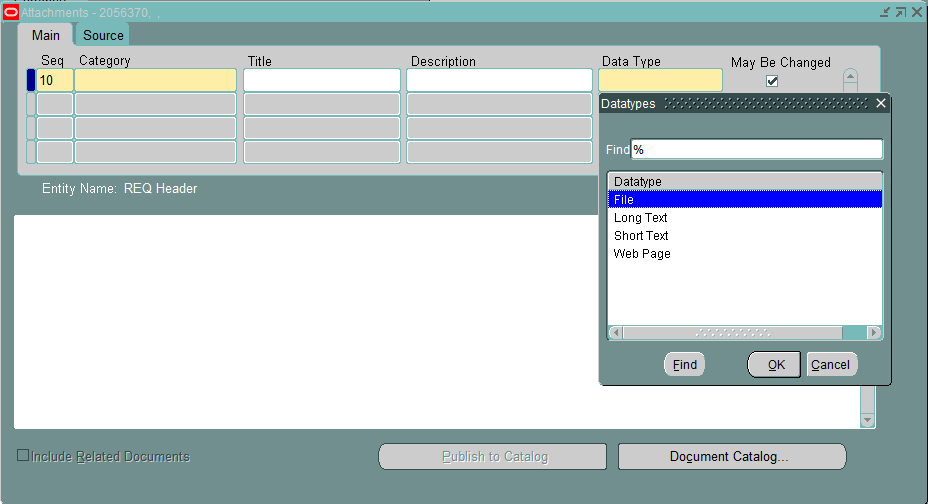
Oracle Apps: Helpful Queries on FND Attachments tables and sample code to extract attachments

This post gives some helpful queries when working on FND Attachment tables. I have also given a sample program to extract these attachment into file system.

Attachment Types are stored in the fnd_document_datatypes table.


select * from fnd_document_datatypes;

Query to retrieve the 'Short Text' Attachments:
 select fad.document_id  
       ,fad.entity_name  
       ,fad.pk1_value  
       ,fad.pk2_value
       ,fdct.user_name "Category"
       ,fdd.user_name "Type"  
       ,fds.short_text  
       ,(fad.entity_name || '_' || fad.document_id ||'_ST.txt') file_name  
 from fnd_attached_documents fad  
     ,fnd_documents fd  
     ,fnd_documents_short_text fds
     ,fnd_document_datatypes fdd
     ,fnd_document_categories_tl fdct  
 where fad.document_id = fd.document_id  
 and   fd.media_id     = fds.media_id  
 and   fd.datatype_id  = fdd.datatype_id  
 and   fd.category_id  = fdct.category_id
 and   fdd.user_name   = 'Short Text'  
 and   fad.entity_name = :p_entity_name -- replace with the entity_name you want to extract.  
 order by fad.pk1_value, pk2_value;  

Query to retrieve the 'Long Text' Attachments:
 select fad.entity_name  
       ,fad.document_id  
       ,fad.pk1_value  
       ,fad.pk2_value
       ,fdct.user_name "Category"
       ,fdd.user_name "Type"  
       ,fdl.long_text  
       ,(fad.entity_name || '_' || fad.document_id ||'_LT.txt') file_name  
 from fnd_attached_documents fad  
     ,fnd_documents fd  
     ,fnd_documents_long_text fdl
     ,fnd_document_datatypes fdd
     ,fnd_document_categories_tl fdct    
 where fad.document_id = fd.document_id  
 and   fd.media_id     = fdl.media_id  
 and   fd.datatype_id  = fdd.datatype_id
 and   fd.category_id  = fdct.category_id  
 and   fdd.user_name   = 'Long Text'  
 and   fad.entity_name = :p_entity_name -- replace with the entity_name you want to extract.  
 order by fad.pk1_value, pk2_value;  

Query to retrieve the 'File' Attachments:
 select fad.entity_name   
       ,fad.document_id  
       ,fad.pk1_value  
       ,fad.pk2_value
       ,fdct.user_name "Category"
       ,fdd.user_name "Type"  
       ,fd.datatype_id  
       ,(fad.entity_name || '_' || fad.document_id ||'_' || fl.file_name) file_name  
       ,fl.file_data  
 from fnd_attached_documents fad  
     ,fnd_documents fd  
     ,fnd_lobs fl
     ,fnd_document_datatypes fdd
     ,fnd_document_categories_tl fdct    
 where fad.document_id = fd.document_id  
 and   fd.media_id     = fl.file_id  
 and   fd.datatype_id  = fdd.datatype_id
 and   fd.category_id  = fdct.category_id  
 and   fdd.user_name   = 'File'  
 and   fad.entity_name = :p_entity_name -- replace with the entity_name you want to extract.  
 order by fad.pk1_value, pk2_value;  

Query to retrieve the 'Web Page' Attachments:

 select fad.entity_name  
       ,fad.document_id  
       ,fad.pk1_value  
       ,fad.pk2_value
       ,fdct.user_name "Category"
       ,fdd.user_name "Type"  
       ,(fad.entity_name || '_' || fad.document_id ||'_URL.txt') file_name  
       ,fd.url  
 from fnd_attached_documents fad  
     ,fnd_documents fd
     ,fnd_document_datatypes fdd
     ,fnd_document_categories_tl fdct    
 where fad.document_id = fd.document_id  
 and   fd.datatype_id  = fdd.datatype_id
 and   fd.category_id  = fdct.category_id  
 and   fdd.user_name   = 'Web Page'  
 and   fad.entity_name = :p_entity_name -- replace with the entity_name you want to extract.  
 order by fad.pk1_value, pk2_value;  

Sample program to extract the attachments into file system.

declare  
  v_file     utl_file.file_type;   
  v_line     varchar2(1000);   
  v_blob_len number;  
  v_pos      number;  
  v_buffer   raw(32764);  
  v_amt      binary_integer := 32764;
  
  cursor cur_short_text_files  
  is  
    select fad.entity_name   
          ,fad.document_id   
          ,fad.pk1_value   
          ,fad.pk2_value   
          ,fds.short_text   
          ,(fad.entity_name || '_' || fad.document_id ||'_ST.txt') file_name   
    from fnd_attached_documents fad   
        ,fnd_documents fd   
        ,fnd_documents_short_text fds  
        ,fnd_document_datatypes fdd   
    where fad.document_id = fd.document_id   
    and   fd.media_id     = fds.media_id   
    and   fd.datatype_id  = fdd.datatype_id   
    and   fdd.user_name   = 'Short Text'   
    and   fad.entity_name = :p_entity_name -- replace with the entity_name you want to extract.   
    order by fad.pk1_value, pk2_value;
  
  cursor cur_long_text_files  
  is  
    select fad.entity_name   
          ,fad.document_id   
          ,fad.pk1_value   
          ,fad.pk2_value   
          ,fdl.long_text   
          ,(fad.entity_name || '_' || fad.document_id ||'_LT.txt') file_name   
    from fnd_attached_documents fad   
        ,fnd_documents fd   
        ,fnd_documents_long_text fdl  
        ,fnd_document_datatypes fdd   
    where fad.document_id = fd.document_id   
    and  fd.media_id      = fdl.media_id   
    and  fd.datatype_id   = fdd.datatype_id   
    and  fdd.user_name    = 'Long Text'   
    and  fad.entity_name  = :p_entity_name -- replace with the entity_name you want to extract.   
    order by fad.pk1_value, pk2_value;
   
  cursor cur_files  
  is  
    select fad.entity_name    
          ,fad.document_id   
          ,fad.pk1_value   
          ,fad.pk2_value   
          ,fd.datatype_id   
          ,(fad.entity_name || '_' || fad.document_id ||'_' || fl.file_name) file_name   
          ,fl.file_data   
    from fnd_attached_documents fad   
        ,fnd_documents fd   
        ,fnd_lobs fl  
        ,fnd_document_datatypes fdd   
    where fad.document_id = fd.document_id   
    and   fd.media_id     = fl.file_id   
    and   fd.datatype_id  = fdd.datatype_id   
    and   fdd.user_name   = 'File'   
    and   fad.entity_name = :p_entity_name -- replace with the entity_name you want to extract.   
    order by fad.pk1_value, pk2_value;
  
  cursor cur_url_files  
  is  
    select fad.entity_name   
          ,fad.document_id   
          ,fad.pk1_value   
          ,fad.pk2_value   
          ,(fad.entity_name || '_' || fad.document_id ||'_URL.txt') file_name   
          ,fd.url   
    from fnd_attached_documents fad   
        ,fnd_documents fd  
        ,fnd_document_datatypes fdd   
    where fad.document_id = fd.document_id   
    and  fd.datatype_id   = fdd.datatype_id   
    and  fdd.user_name    = 'Web Page'   
    and  fad.entity_name  = :p_entity_name -- replace with the entity_name you want to extract.   
    order by fad.pk1_value, pk2_value;
  
begin
  
  -- Short Text Attachments   
  for c_file in cur_short_text_files  
  loop  
    v_file := utl_file.fopen('XX_EXTRACT_DIR',c_file.file_name, 'W', 32764);  
    utl_file.put(v_file,c_file.short_text);  
    utl_file.fclose(v_file);   
  end loop;
  
  -- Long Text Attachments   
  for c_file in cur_long_text_files  
  loop  
    v_file := utl_file.fopen('XX_EXTRACT_DIR',c_file.file_name, 'W', 32764);  
    utl_file.put(v_file,c_file.long_text);  
    utl_file.fclose(v_file);   
  end loop;
  
  -- File Attachments  
  for c_file in cur_files  
  loop  
    v_file := utl_file.fopen('XX_EXTRACT_DIR',c_file.file_name, 'wb', 32764);  
    v_blob_len := dbms_lob.getlength(c_file.file_data);  
    v_pos := 1;  
    while v_pos < v_blob_len  
    loop  
      dbms_lob.read(c_file.file_data,v_amt,v_pos,v_buffer);  
      utl_file.put_raw(v_file,v_buffer,true);  
      v_pos := v_pos + v_amt;  
    end loop;   
    utl_file.fclose(v_file);   
  end loop;
  
  --Web Page Attachments  
  for c_file in cur_url_files  
  loop  
    v_file := utl_file.fopen('XX_EXTRACT_DIR',c_file.file_name, 'W', 32764);  
    utl_file.put(v_file,c_file.url);  
    utl_file.fclose(v_file);   
  end loop;       
end;  

Note: The oracle directory object 'XX_EXTRACT_DIR' should be created before running the script. Refer the below blog to see how to use utl_file package.
Johny's Oracle Tips: PL/SQL: Sample code for UTL_FILE


Feel free to point out if anything is missing/wrong in this blog.

Thursday, 28 January 2016

Oracle Apps: Query to get the profile option values from backend

The below given is a query to get the Profile Option values at all levels from the backend. This query is very useful when you want to check which all levels the Profile is being set and what are the values.


 select fpo.profile_option_id   
       ,fpo.profile_option_name   
       ,fpo.user_profile_option_name   
       ,decode(level_id,10001,'Site'             
                       ,10002,'Application'  
                       ,10003,'Responsibility'  
                       ,10004,'User'  
                       ,10006,'Organization') profile_level   
       ,decode(level_id,10002, (select application_name    
                                from apps.fnd_application_vl    
                                where application_id = level_value )   
                       ,10003, (select responsibility_name    
                                from apps.fnd_responsibility_vl    
                                where responsibility_id = level_value)   
                       ,10004, (select user_name    
                                from apps.fnd_user    
                                where user_id = level_value)   
                       ,10006, (select name      
                                from apps.hr_all_organization_units       
                                where organization_id = level_value)) level_value   
       ,profile_option_value   
  from apps.fnd_profile_options_vl fpo   
      ,apps.fnd_profile_option_values fpov   
  where fpo.profile_option_id = fpov.profile_option_id    
  and   (fpo.profile_option_name like 'AJ_TEST_PROFILE'    
         or fpo.user_profile_option_name like 'AJ Test Profile');   


Feel free to point out if anything is missing/wrong in this blog.

Wednesday, 28 October 2015

OAF: Calling AM method from CO in Oracle Application Framework

In this post I just want to put some sample code to show how to call the Application Module (AM) methods from the Controller (CO). The reason for this post with the basics is because, I still see in the OTN forum that AM methods are not called in the recommended approach.

In this post I have given example for methods with parameters, without parameters, couple of different types of parameters and methods with return types.

Sample 1:- AM method without parameter and return type.

AM Method:
 public void methodWithoutParams()  
 {  
   System.out.println("Dummy Method");  
 }  
CO Code:
 import oracle.apps.fnd.framework.server.OAApplicationModuleImpl;  
 OAApplicationModuleImpl appModule = (OAApplicationModuleImpl)pageContext.getApplicationModule(webBean);  
 appModule.invokeMethod("methodWithoutParams");  

Sample 2 :- AM method with parameters and return type.

AM Method:
 public String methodWithParams(String[] strArray,String strVal)  
 {  
      System.out.println("strVal: " + strVal);  
      for(int i = 0; i < strArray.length; i ++)       
      {  
           System.out.println("strArray["+i+"]: " + strArray[i]);  
      }  
      return "Success";  
 }  
CO Code:
 import oracle.apps.fnd.framework.server.OAApplicationModuleImpl;  
 import java.io.Serializable;  
 OAApplicationModuleImpl appModule = (OAApplicationModuleImpl)pageContext.getApplicationModule(webBean);  
 String[] strArray = {"1","2"};  
 String strVal   = "AJ";  
 Serializable[] params = {strArray, strVal};  
 Class[] paramTypes  = {String[].class, String.class};  
 String returnVal = (String)appModule.invokeMethod("methodWithParams", params, paramTypes);  
 System.out.println("returnVal : "+ returnVal);  

If we need to deal with non-Serializable parameters, refer : http://www.adftraining.com/blog/how-to-call-am-methods-from-controller-without-using-invokemethod

Feel free to point out if anything is missing/wrong in this blog.

Monday, 26 October 2015

Oracle Apps: Some useful UNIX tips when working on Oracle Apps / Oracle eBusiness

In this post, I just want to put some useful UNIX commands when working on Oracle Apps/ eBusiness. This will be updated frequently with more commands.If you are reading this, you can contribute more commands in the comments and I can reference in this blog (obviously your name against it :)), which can help someone else as well.

#1. How to run .env file.
ENV files needs to be run to set the environment files for the session. I have seen some people try to run the file with 'sh' command and complains that the environment variables are not set. To run the env file, you just type (dot)(space)(filename).
 $ . <file_name>.env  

Related link: What are source environment file settings in Oracle Applications R12

#2. How to search for a file name.
You can search using the find command. 
Just type find(space)(starting directory)(space)-name(space)(file_name)
 find /home -name <file_name>  

More help: In Unix, what is the find command, and how do I use it to search through directories for files?


#3. How to find the version of a file.
You can use any of the below commands to get the header info of a file.
 $ adident Header <file_name>  
 $ strings -a <file_name> | grep Header  

Related links : 
Check Versions of Oracle Applications Components
Oracle Technical : How to find Files Versions and Locations

Feel free to point out if anything is missing/wrong in this blog.

Wednesday, 14 October 2015

PL/SQL: Sample code for using PRAGMA AUTONOMOUS_TRANSACTION

In this post I just want to post a sample code (which I use) to write debug in PL/SQL using PRAGMA AUTONOMOUS_TRANSACTION.

The AUTONOMOUS_TRANSACTION pragma changes the way a subprogram works within a transaction. A subprogram marked with this pragma can do SQL operations and commit or roll back those operations, without committing or rolling back the data in the main transaction. Read more
 --create table  
 create table xxaj_debug (id number, msg varchar2(4000), date_stamp date);  
 --create sequence  
 create sequence xxaj_seq start with 1 increment by 1;  
 --create procedure  
 create or replace procedure xxaj_proc ( msg varchar2)  
 is  
      PRAGMA AUTONOMOUS_TRANSACTION;  
 begin  
      insert into xxaj_debug values (xxaj_seq.nextval, msg, sysdate);  
      commit;  
 end;  


Feel free to point out if anything is missing/wrong in this blog.