In this post I will give an example to show how to create a PVO ("Application Properties" View Object) and use the attributes to change the properties of the bean dynamically. I will give same method to set the PVO Attribute values. This method can be used when there is only 1 attribute to be set or if there are multiple attributes.
Scenario:
I have created 2 tables in the page (say Table1 and Table2). I need to show Table1 when the page loads and hide Table2. Based on some conditions, I will need to change the Tables in screen dynamically.
Write the below code in the processFormRequest based on your condition.Change the values of the val[] appropriately, based on your use case.
You can use the below syntax to set the Rendered property of the bean.
${oa.XXCustomPVO1.RenderAttr1}
${oa.XXCustomPVO1.RenderAttr2}
Feel free to point out if anything is missing/wrong in this blog.
Scenario:
I have created 2 tables in the page (say Table1 and Table2). I need to show Table1 when the page loads and hide Table2. Based on some conditions, I will need to change the Tables in screen dynamically.
- Create a PVO with 2 attributes (1 for each table). Set the value of the attribute appropirately.
- Use Spel binding to associate the attribute to the table. Refer: OAF: Spel Binding
Create PVO with 2 attributes (I have created one additional Id column also, which can be set as the Key Attribute). Make sure that you set the Updatable property to 'Always'.


Write the below code in the processRequest of the Controller. This will create a Row in the PVO and initialize the PVO attributes.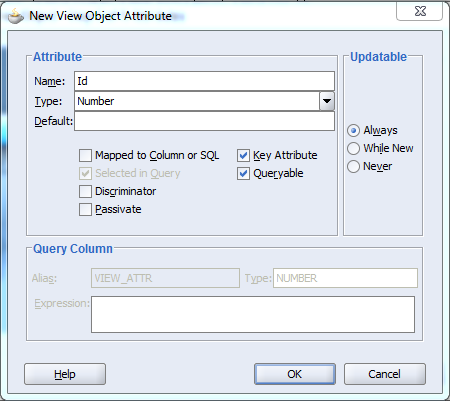


Add this VO to the Application Module and then add the below methods in the AMImpl.
importoracle.jbo.domain.Number;
 public void intializeXXCustomPVO()
 {
      OAViewObjectImpl xxCustomPVO = getXXCustomPVO1();
      if(xxCustomPVO.getRowCount() == 0 )
      {
           Row xxCustomPVORow = xxCustomPVO.createRow();
           xxCustomPVORow.setNewRowState(Row.STATUS_INITIALIZED);
           xxCustomPVORow.setAttribute("Id",new Number(-1));
           xxCustomPVO.insertRow(xxCustomPVORow);
      }
 }
 public void setXXCustomPVOValues(String[] name,String[] val)
 {
      OAViewObjectImpl xxCustomPVO = getXXCustomPVO1();
      xxCustomPVO.setRangeSize(-1);
      Row row = xxCustomPVO.getRowAtRangeIndex(0);
      for(int i = 0; i < name.length; i ++)
      {
           if("Y".equals(val[i]))
           {
                row.setAttribute(name[i],Boolean.TRUE);
           }
           else
           {
                row.setAttribute(name[i],Boolean.FALSE);
           }
      }
 }
importjava.io.Serializable;importoracle.apps.fnd.framework.server.OAApplicationModuleImpl;
 OAApplicationModuleImpl appModule = (OAApplicationModuleImpl)pageContext.getApplicationModule(webBean);
 appModule.invokeMethod("intializeXXCustomPVO");

 String[] name = {"RenderAttr1","RenderAttr2"};
 String[] val  = {"Y","N"};

 Serializable[] params = {name, val};
 Class[] paramTypes    = {String[].class, String[].class};

 appModule.invokeMethod("setXXCustomPVOValues", params, paramTypes);
Write the below code in the processFormRequest based on your condition.Change the values of the val[] appropriately, based on your use case.
 OAApplicationModuleImpl appModule = (OAApplicationModuleImpl)pageContext.getApplicationModule(webBean);

 String[] name = {"RenderAttr1","RenderAttr2"};
 String[] val  = {"N","Y"};

 Serializable[] params = {name, val};
 Class[] paramTypes    = {String[].class, String[].class};

 appModule.invokeMethod("setXXCustomPVOValues", params, paramTypes);
You can use the below syntax to set the Rendered property of the bean.
${oa.XXCustomPVO1.RenderAttr1}
${oa.XXCustomPVO1.RenderAttr2}
Feel free to point out if anything is missing/wrong in this blog.
