Friday, 5 June 2015

Forms & Reports: How to install 11gR2 Forms and Reports Builder in Windows 7 64bit OS

It took some time for me to successfully install Oracle Forms and Reports Builder in my Windows 7 64 bit machine, because of the Java version and 32 bit/64 bit issues. So I thought I will add this to my blog, so that it will be useful for others and also for my future reference.

The steps are detailed in this excellent post: Installing Oracle Forms and Reports 11G Release 2. 

I will just mention the main points here. For the detailed instructions you can follow the above mentioned blog.


  • Install 64 bit JDK. I installed JDK 7u79 (jdk-7u79-windows-x64.exe).
http://www.oracle.com/technetwork/java/javase/downloads/jdk7-downloads-1880260.html

  • Install Weblogic Server 10.3.6. Make sure that you download the Generic version (wls1036_generic.jar). I missed this point and wasted 2-3 hours :).
http://www.oracle.com/technetwork/middleware/weblogic/downloads/wls-main-097127.html
  • Install Oracle Forms and Reports 11g Release 2 64bit. I installed 11.1.2.2.0. (ofm_frmrpts_win_11.1.2.2.0_64_disk1_1of2.zip & ofm_frmrpts_win_11.1.2.2.0_64_disk1_2of2.zip)


Feel free to point out if anything is missing/wrong in this blog.

Wednesday, 3 June 2015

OAF: Issues associated with VO Substitution in Oracle Applications Framework - Part2

In this post I will explain the fix for some other issues associated with VO Substitution in Oracle Application Framework.

This is the continuation of my other blogs on the VO Substitution issues:
OAF: Issues associated with VO Substitution in Oracle Applications Framework - Part1
OAF: Transient Attributes not getting populated in Extended VO


Sample errors:
## Detail 0 ## java.sql.SQLException: Attempt to set a parameter name that does not occur in the SQL: INVOICE_ID

## Detail 0 ## java.sql.SQLSyntaxErrorException: ORA-01722: invalid number

Reference of errors :
https://community.oracle.com/thread/3729150
https://community.oracle.com/thread/3727660


Fix:
Change the Binding Style of VO from 'Oracle Named' to 'Oracle Positional'.


Refer the below link for more details about the Named and Positional bindings.
Binding and Defining


Feel free to point out if anything is missing/wrong in this blog.

Tuesday, 2 June 2015

OAF: EL (Expression Language)


Prior to Release 12.2, EL support was referred to as SPEL (Simplest Possible Expression Language) support, which included a subset of the currently supported EL types and EL-supporting properties.
You could find more details of SPEL in my other blog: OAF: Spel Binding

The below details are from the OA Framework Developer's Guide 12.2.3 : Oracle Application Framework Developer's Guide Release 12.2.3 (Doc ID 1593765.1)

EL Types
${oa.<ViewInstance>.<ViewAttr>}
Evaluates to <ViewInstance>.getAttribute("<ViewAttr>").
${oa.current.<ViewAttr>}
Evaluates to <ViewInstance_attached_to_the_bean>.getAttribute("<ViewAttr>").
${oa.encrypt.<ViewInstance>.<ViewAttr>}
Returns the encrypted value of the <ViewInstance>.getAttribute("<ViewAttr>") statement.
${oa.FunctionSecurity.<FunctionName>}
Returns true or false depending on whether FunctionName is granted to the current user.
${oa.request.<paramName>}
Evaluates to pageContext.getParameter("<paramName>").
${oa.session.<paramName>}
Evaluates to pageContext.getSessionValue("<paramName>").
${oa.sessiondirect.<paramName>}
Evaluates to pageContext.getSessionValueDirect("<paramName>").
${oa.txn.<paramName>}
Evaluates to pageContext.getTransactionValue("<paramName>").
${oa.txntrans.<paramName>}
Evaluates to pageContext.getTransactionTransientValue("<paramName>").
${oa.pageContext.<methodName>}
Evaluates to pageContext.<methodName>().
Note: Only public methods without parameters may be invoked using this EL syntax.
${oa.class.<className>.<methodName>}
Invokes the method in the specified class.
Notes:
• Provide <className> as a fully qualified class name.
• The class must have a no-argument (zero argument) constructor.
• Only public methods without parameters may be invoked using this EL expression.

Usage Notes:
  • Use oa.boolean.false or oa.boolean.true to represent Boolean.FALSE or Boolean.TRUE, respectively.
  • For the negation or ! (NOT) operator, use oa.boolean.false, as in the example,  ${oa.session.isItemRendered == oa.boolean.false}.
  • For an EL expression:
    • You may only specify a static numeric value.
    • Use ${oa.text.<TEXT>} to represent a string.
    • Use oa.boolean.false or oa.boolean.true to represent a Boolean.
Sample Usage:

  • ${oa.session.param1 == oa.request.param1}
  • ${oa.session.paramLength + ( oa.request.fieldLength * 2 ) }
  • ${oa.session.isItemRendered == oa.boolean.false}

Combining Static Text with EL
Use the syntax ${oa.text.<TEXT>} to prepend or append static text to an EL expression.

Usage Notes
  • Warning: If you append static text to an EL expression, be aware that the static text will not get translated and the order of the text may vary depending on the language.
  • You may append text to an EL expression in any order, as shown in these examples, where ${EL} represents any valid EL type:
    • ${oa.text.<TEXT>} + ${EL}
    • ${EL} + ${oa.text.<TEXT>} + ${EL}
Sample Usage
  • ${oa.text.Welcome Mr.} + ${oa.EmpVO.Empname}

Feel free to point out if anything is missing/wrong in this blog.

OAF: Spel Binding

Simplest Possible Expression Language (SPEL) - An industry-standard expression language included in the JSP Standard Tag Library (JSTL)

For selected properties, OA Framework supports the use of SPEL expressions to quickly bind the property to an underlying data source that provides the property's value. For example, you could bind the Rendered property of a button to a view object attribute to ascertain whether it should be hidden or shown when the page renders.

The SPEL syntax for this property looks like:
   ${oa.<ViewInstanceName>.<ViewAttributeName>}
       
      eg:-  ${oa.XXViewObject1.ViewAttrName}

If you are working with a table-in-table or HGrid that uses view links, you need to modify your SPEL syntax as shown: ${oa.current.viewAttrName}. The inclusion of current keyword lets you say "get the value from whatever row BC4J is using to render the current row" since you won't know how to access the view objects and row sets created dynamically for these complex components.

To add a VOAttribute value in a link 
eg: OA.jsp?OAFunc=XXX_FUNC&VENDOR_SITE_ID={@VendorSiteId}&SUPP_NAME={@SupplierName}

You can also use SPEL based on the security grant. The below expression will return false if <FunctionName> is granted to the current user/responsibility, otherwise true. 
   ${oa.FunctionSecurity.<FunctionName>}

If you want to pass a attribute for the form submission and if you want to encrypt the parameter, you can add the expression as below in the parameters property window:
   ${oa.encrypt.<ViewInstanceName>.<ViewAttributeName>} 

From 12.2, there is more support: OAF: EL (Expression Language)

Feel free to point out if anything is missing/wrong in this blog.

Monday, 1 June 2015

OAF: JDR_UTILS

In this post I will explain some of the procedures of JDR_UTILS, which will be useful when you work on OA Framework. You can describe the JDR_UTILS package if you have apps user database account access.

Most commonly used procedures are as below:

listCustomizations 
printDocument
deleteDocument
listDocuments

  • jdr_utils.listCustomizations()
This procedure can be used to check whether any personalization exists for a particular page or  substitution exists for a particular EO/VO/AM.
 begin  
  jdr_utils.listCustomizations('/ajtest/oracle/apps/fnd/test/webui/TestPG');  
 end;  
 begin  
  jdr_utils.listCustomizations('/ajtest/oracle/apps/fnd/test/server/TestVO');  
 end;  
  • jdr_utils.printDocument()
This procedure can be used to get the Page / Personalization / Substitution file. You can pass the output of the above procedure as a parameter to this procedure to get the details.
 begin  
  jdr_utils.printDocument('/ajtest/oracle/apps/fnd/test/webui/TestPG');  
 end;  
 begin  
  jdr_utils.printDocument('/ajtest/oracle/apps/fnd/test/webui/customizations/site/0/TestPG');  
 end;  
 begin  
  jdr_utils.printDocument('/ajtest/oracle/apps/fnd/test/server/customizations/site/0/TestVO');  
 end;  
  • jdr_utils.deleteDocument()
This procedure can be used to delete a particular Page / Personalization / Substitution. Please be careful when you use this procedure. Make sure that you are using the right parameter when using this procedure. You will have to COMMIT after calling calling this procedure.
 begin  
   jdr_utils.deleteDocument('/ajtest/oracle/apps/fnd/test/webui/TestPG');  
 end;  
 begin  
   jdr_utils.deleteDocument('/ajtest/oracle/apps/fnd/test/webui/customizations/site/0/TestPG');  
 end;  
 begin  
   jdr_utils.deleteDocument('/ajtest/oracle/apps/fnd/test/server/customizations/site/0/TestVO');  
 end;  
  • jdr_utils.listDocuments()
This procedure will print all the files under the specified path. 
 begin  
   jdr_utils.listDocuments('/ajtest/oracle/apps/fnd/test/webui');  
 end;  
You can add an additional parameter to recursively print all the documents under the specified path
 begin  
   jdr_utils.listDocuments('/ajtest/oracle/apps/fnd/test',true);  
 end;  

A nice explanation of all the API's in jdr_utils is available in this blog : List of JDR_UTILS APIs
Feel free to point out if anything is missing/wrong in this blog.
Sunday, 31 May 2015

OAF: Import/Export Page/Personalization/Substitution using XMLImporter/JPXImporter in Oracle Application Framework

In this post, I will give the syntax for importing/exporting page/personalization/substitution in OA Framework from unix/windows machines.

Import Page/Personalization.
We will use the class XMLIMporter for importing the page or personalization into the database.

From Unix:
 java oracle.jrad.tools.xml.importer.XMLImporter <dir_path>/<file_name>.xml 
 -username <user_name> -password <password> 
 -dbconnection "(DESCRIPTION=(ADDRESS=(PROTOCOL=tcp)(HOST=<host_name>)(PORT= <port_number>)) (CONNECT_DATA=(SID=<database_sid>)))" 
 -rootdir <dir_path> -rootPackage <package>  
Example:
 java oracle.jrad.tools.xml.importer.XMLImporter $PWD/TestPG.xml 
 -username apps -password apps 
 -dbconnection "(DESCRIPTION=(ADDRESS=(PROTOCOL=tcp)(HOST=192.168.160.129) (PORT=1522))(CONNECT_DATA=(SID=VIS121)))" 
 -rootdir $PWD -rootPackage /ajtest/oracle/apps/fnd/test/webui/  
 java oracle.jrad.tools.xml.importer.XMLImporter $PWD/TestPG.xml 
 -username apps -password apps 
 -dbconnection "(DESCRIPTION=(ADDRESS=(PROTOCOL=tcp)(HOST=192.168.160.129) (PORT=1522))(CONNECT_DATA=(SID=VIS121)))" 
 -rootdir $PWD -rootPackage /ajtest/oracle/apps/fnd/test/webui/customizations/site/0/  
From Windows:
The import.bat file will be available under the Jdev installation under jdevbin/oaext/bin
 import <dir_path>/<file_name>.xml 
 -username <user_name> -password <password> 
 -dbconnection "(DESCRIPTION=(ADDRESS=(PROTOCOL=tcp)(HOST=<host_name>)(PORT=<port_number>))(CONNECT_DATA=(SID=<database_sid>)))" 
 -rootDir <dir_path> -rootPackage <package>  
Example:
 C:\oracle\JdevR12.1.3\jdevbin\oaext\bin\import C:\oracle/JdevR12.1.3/jdevbin/jdev/myprojects/ajtest/oracle/apps/fnd/test/webui/TestPG.xml 
 -username apps -password apps 
 -dbconnection "(DESCRIPTION=(ADDRESS=(PROTOCOL=tcp)(HOST=192.168.160.129)(PORT=1522))(CONNECT_DATA=(SID=VIS121)))" -rootDir C:\oracle/JdevR12.1.3/jdevbin/jdev/myprojects/ 
 -rootPackage /ajtest/oracle/apps/fnd/test/webui/  
Import EO/VO/AM Substitution.
We will use the class JPXIMporter for importing the substitution into the database.
 java oracle.jrad.tools.xml.importer.JPXImporter <dir_path>/<file_name>.jpx 
 -username <user_name> -password <password> 
 -dbconnection "(DESCRIPTION=(ADDRESS=(PROTOCOL=tcp)(HOST=<host_name>)(PORT= <port_number>)) (CONNECT_DATA=(SID=<database_sid>)))"  
Example:
 java oracle.jrad.tools.xml.importer.JPXImporter $PWD/AJProject.jpx 
 -username apps -password apps 
 -dbconnection "(DESCRIPTION=(ADDRESS=(PROTOCOL=tcp)(HOST=192.168.160.129) (PORT=1522))(CONNECT_DATA=(SID=VIS121)))"  
Export Page/Personalization.
We will use the class XMLExporter for exporting the page or personalization from the database. When you execute these commands don't give the extension for the file name. 

From Unix:
 java oracle.jrad.tools.xml.exporter.XMLExporter <dir_path>/<file_name> -rootdir <dir_path> 
 -username <user_name> -password <password> 
 -dbconnection "(DESCRIPTION=(ADDRESS=(PROTOCOL=tcp)(HOST=<host_name>)(PORT=<port_number>))(CONNECT_DATA=(SID=<database_sid>)))"  
Example:
 java oracle.jrad.tools.xml.exporter.XMLExporter /ajtest/oracle/apps/fnd/test/webui/TestPG 
 -rootdir $PWD 
 -username apps -password apps 
 -dbconnection "(DESCRIPTION=(ADDRESS=(PROTOCOL=tcp)(HOST=192.168.160.129)(PORT=1522))(CONNECT_DATA=(SID=VIS121)))"  
From Windows:
The export.bat file will be available under the Jdev installation under jdevbin/oaext/bin
 export <dir_path>/<file_name> 
 -rootdir <dir_path> 
 -username <user_name> -password <password> 
 -dbconnection "(DESCRIPTION=(ADDRESS=(PROTOCOL=tcp)(HOST=<host_name>)(PORT=<port_number>))(CONNECT_DATA=(SID=<database_sid>)))"  
Example:
 C:\oracle\JdevR12.1.3\jdevbin\oaext\bin\export /ajtest/oracle/apps/fnd/test/webui/TestPG 
 -rootdir C:\test\ 
 -username apps -password apps 
 -dbconnection "(DESCRIPTION=(ADDRESS=(PROTOCOL=tcp)(HOST=192.168.160.129)(PORT=1522))(CONNECT_DATA=(SID=VIS121)))"  

You can also export the files from database using jdr_utils package, which is explained in my other blog JDR_UTILS.

Related Links: OAF: Exception in thread "main" java.lang.UnsupportedClassVersionError: Bad version number in .class file

Feel free to point out if anything is missing/wrong in this blog.

Saturday, 30 May 2015

OAF: How to create a HTML Tab Menu in Oracle Application Framework

I have seen couple of questions in OTN Forum on how to create a HTML Tab Menu in OA Framework. So here I will explain the structure to create a Menu Structure like the one given below:

It would be better to write down the Menus and the Functions based on your requirement first. Then start to create the Function --> HTML Tab Menu --> Home Page Menu --> Standard Menu (Root Menu) --> Responsibility.

The Menu selection is highlighted using the OAHP (Home Page) and OASF (Selected Function) parameters in the Web HTML Call of the Function definition. 

The Menus and Functions defined in this example is given below.
Menu Definition
Header Syntax: User Menu Name (Menu) [Menu Type]
Line   Syntax: Seq --> Prompt --> SubMenu --> Function
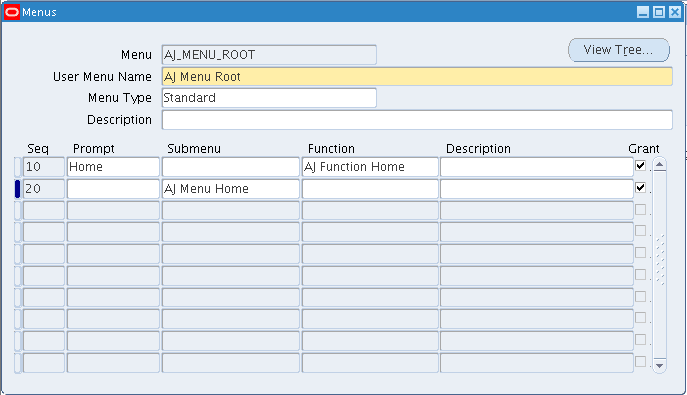
 AJ Menu Root(AJ_MENU_ROOT)[Standard]  
      10 --> Home --> ---          --> AJ Function Home  
      20 --> ---  --> AJ Menu Home --> ---  
 AJ Menu Home(AJ_MENU_HOME)[Home Page]  
      10 --> ---        --> ICX_STANDARD_GLOBAL_MENU --> ---  
      20 --> ABC Header --> AJ ABC Header Menu       --> ---  
      30 --> XYZ Header --> AJ XYZ Header Menu       --> ---  
 AJ ABC Header Menu (AJ_ABC_HEADER_MENU)[HTML Tab]  
      10 --> A Line   --> ---  --> AJ A Line Function  
      20 --> B Line   --> ---  --> AJ B Line Function  
      30 --> C Line   --> ---  --> AJ C Line Function  
 AJ XYZ Header Menu (AJ_XYZ_HEADER_MENU)[HTML Tab]  
      10 --> X Line   --> ---  --> AJ X Line Function  
      20 --> Y Line   --> ---  --> AJ Y Line Function  
      30 --> Z Line   --> ---  --> AJ Z Line Function  
Function Definition
Header Syntax: User Function Name (Function)
Line   Syntax: HTML Call
 AJ A Line Function (AJ_A_LINE_FUNC)  
      OA.jsp?page=/ajtest/oracle/apps/fnd/test/webui/TestPG&OAHP=AJ_MENU_HOME&OASF=AJ_A_LINE_FUNC  
 AJ B Line Function (AJ_B_LINE_FUNC)  
      OA.jsp?page=/ajtest/oracle/apps/fnd/test/webui/TestPG&OAHP=AJ_MENU_HOME&OASF=AJ_B_LINE_FUNC  
 AJ C Line Function (AJ_C_LINE_FUNC)  
      OA.jsp?page=/ajtest/oracle/apps/fnd/test/webui/TestPG&OAHP=AJ_MENU_HOME&OASF=AJ_C_LINE_FUNC  
 AJ X Line Function (AJ_X_LINE_FUNC)  
      OA.jsp?page=/ajtest/oracle/apps/fnd/test/webui/TestPG&OAHP=AJ_MENU_HOME&OASF=AJ_X_LINE_FUNC  
 AJ Y Line Function (AJ_Y_LINE_FUNC)  
      OA.jsp?page=/ajtest/oracle/apps/fnd/test/webui/TestPG&OAHP=AJ_MENU_HOME&OASF=AJ_Y_LINE_FUNC  
 AJ Z Line Function (AJ_Z_LINE_FUNC)  
      OA.jsp?page=/ajtest/oracle/apps/fnd/test/webui/TestPG&OAHP=AJ_MENU_HOME&OASF=AJ_Z_LINE_FUNC  
 AJ Function Home(AJ_FUNCTION_HOME)  
      OA.jsp?OAFunc=AJ_A_LINE_FUNC&OAHP=AJ_MENU_HOME&OASF=AJ_FUNCTION_HOME  
Screenshot of the Responsibility/Menu/Functions below:

  • Responsibility
  • Root Menu
  • Home Page Menu
  • ABC Header Menu [HTML Tab]

  • XYZ Header Menu [HTML Tab]
  • Functions
Make sure you clear the cache using Functional Administrator, before you try to access the Menu. Once you run the page the outputs will be like below:


The contents of all the pages looks the same because, I have created only one PG.xml :)

Feel free to point out if anything is missing/wrong in this blog.