Showing posts with label Concurrent Program. Show all posts

Monday, 28 June 2021

Oracle Apps: How to Schedule Concurrent Program to run at a specific time from back-end

In my previous posts I have explained about how can we make the parent concurrent program wait for all the child programs to complete and how to submit a concurrent program from the backend periodically etc.... In this one I thought of giving an example of how to submit a concurrent program to run at a specific time.

Inorder to do that we just need to specify the 'start_date' parameter in the procedure fnd_request.submit_request. But the thing which we need to be careful is, this parameter is of type VARCHAR2. So if don't pass a date variable to this value, it will truncate the date and the time component will be removed. It will result in the program starting straight away if the date is on the same day or exactly 12:00 AM of the date (if the date is a future date). When you pass the parameter pass the date and time in the format 'DD-Mon-YYYY HH24:MI:SS'

A Sample can be like below. I have just added 3 hours to current date and converted into varchar using TO_CHAR function. You can also specify the time directly like '29-Jun-2021 10:00:00'

DECLARE
 
   v_request_id        NUMBER;
   v_status            BOOLEAN;
 
BEGIN
   --Initialize the session with appropirate values
   fnd_global.apps_initialize (user_id=>100
                              ,resp_id=>100
                              ,resp_appl_id=>100);
 
   --Submit the Request
   v_request_id := fnd_request.submit_request ( application => 'XXAJ'
                                              , program     => 'XXAJ_PROGRAM'
                                              , start_time  => TO_CHAR(SYSDATE + 3/24,'DD-Mon-YYYY HH24:MI:SS')
                                              , sub_request => FALSE);
   COMMIT;
 
   IF v_request_id = 0 THEN
      DBMS_OUTPUT.put_line('Request not submitted: '|| fnd_message.get);
   ELSE
      DBMS_OUTPUT.put_line('Request submitted successfully. Request id: ' || v_request_id);
   END IF;
 
EXCEPTION
   WHEN OTHERS THEN
     DBMS_OUTPUT.put_line('Exception: ' || SQLERRM);   
END;
 

Reference: 


Feel free to point out if anything is wrong/missing in this blog.

Saturday, 27 February 2021

Oracle Apps: How to set Concurrent Program Parameter Disabled / Readonly

This post is to show how can me make a concurrent program parameter disabled / readonly.

You might be wondering why do you want to make a concurrent program parameter readonly, when we could just set the display false for the parameter. But this is to fix the issues identified by my colleagues in the solution given in the below post. 

Oracle Apps : Selecting Multiple values for a parameter in Concurrent Program 

The issues identified on the above solution is

If the user removes the value from the Multiselect field manually, then user will not be able to select any more.

The reason is because once you modify the parameter value, then the default query will not be executed. The solution is to make the field disabled, so that user will not be able to clear the values manually. They will be forced to use the 'Clear' option in the original list.

Steps to make the field disabled/read only.

1.  Create a new valueset of type 'Special'. We just need to put some dummy PLSQL block for the Edit and Validate events.

Override the Edit event, this will make the field read only. You don't need to do write any logic in this, just add a dummy PLSQL block for this event.

Validate event user exit is mandatory for a special valueset, else you will get an error when submitting the concurrent program.  So just add a dummy PLSQL block for validate event as well.

Code used in both the events.

FND PLSQL   
 "  
  DECLARE  
   v_sel_fruit_list VARCHAR2(240):= :!VALUE;  
  BEGIN  
   NULL;  
  END;  
 "


2. Attach this valuset to the Multiselect parameter.

Now, when you submit the concurrent program, this parameter will be disabled. User will not be able to modify the values in this parameter directly. The value in this parameter will need to be updated by the first parameter.


To see how to use special valuset for validation on concurrent program parameter :


Feel free to point out if anything is missing/wrong in this blog.


Monday, 8 February 2021

Oracle Apps : Selecting Multiple values for a parameter in Concurrent Program

We had a requirement to select multiple values from a list when submitting the Concurrent Program.

Few of the options suggested were as below:

1. Create a custom Form and capture the values and then submit the Concurrent Program form a button click .  

  • This was ruled out as we didn't want to create a new Form

2. Let the users enter a comma separated values in the parameter field and split the values in the code.

  • This was ruled out as there is a probability that the user may enter wrong values

We found a blog where someone suggested some solution with some limitations. 

The solution given below is without the limitation mentioned in the above link. The limitation we have is the length of the parameter field (240 characters). I have suggested a workaround for that also below.

Edited: This solution needs to be read along with the below post.

Oracle Apps: How to set Concurrent Program Parameter Disabled / Readonly

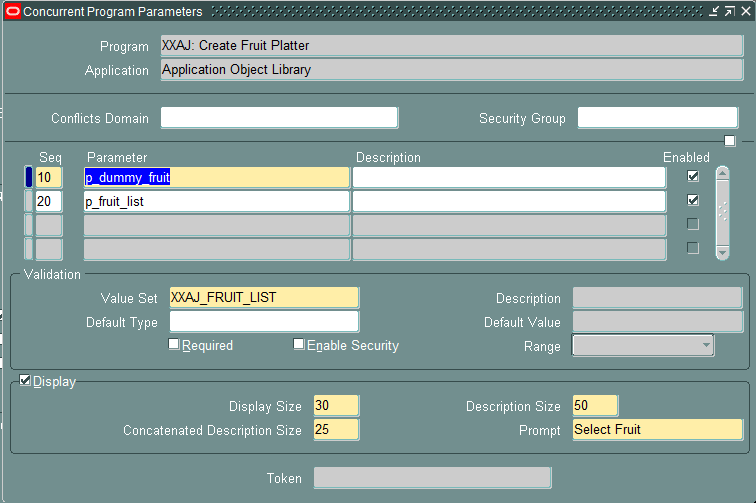
The Concurrent Program example given below has 2 Parameters. One is the original list and the second is the selected values from the list.

1. Create a Valueset with the needed values. Make sure that you have an extra value in the list, which will be user to clear the selected list. In my example I have created a valueset with the list of Fruits. Please note, there is a value in the list 'Clear'. Usage of the value 'Clear' is explained below.


2. Create the Executable and the Concurrent Program.


3. Add the original list as the first parameter. This parameter is used only as the selection list. The actual program ignores this parameter. 


4. Now is the interesting part of this solution. Create another parameter which will get populated using the values you select from the first parameter. Before creating this parameter, you need to have the package and procedure ready.  This parameter should have the below properties.

Valueset : 

240 Characters

Default Type: 

SQL Statement

Default Value :  

select xxaj_fruit_platter_pkg.get_selected_list(:$FLEX$.XXAJ_FRUIT_LISTfrom dual


The code for the function get_selected_list is as below :

 FUNCTION get_selected_list(p_fruit VARCHAR2)  
 RETURN VARCHAR2  
 IS  
 BEGIN
   IF p_fruit = 'Clear' THEN
     v_selected_list := NULL;
    
   ELSE 
     --Concatenate the selected value to the existing list  
     SELECT NVL2(v_selected_list,v_selected_list ||',',v_selected_list) || p_fruit   
     INTO v_selected_list   
      FROM dual;  
    END IF;
    
    RETURN v_selected_list;  
  END get_selected_list;  

v_selected_list is a package level variable and everytime when this function gets called, it just keep appending the values in the variable v_selected_list. If the value Clear  selected in the first parameter, the function will clear the package variable and then also remove the values from the second parameter. Package level variable is visible only on the session, so if multiple users try to submit the job at the same time, this will not cause any issues.

The full code of the package is given below.

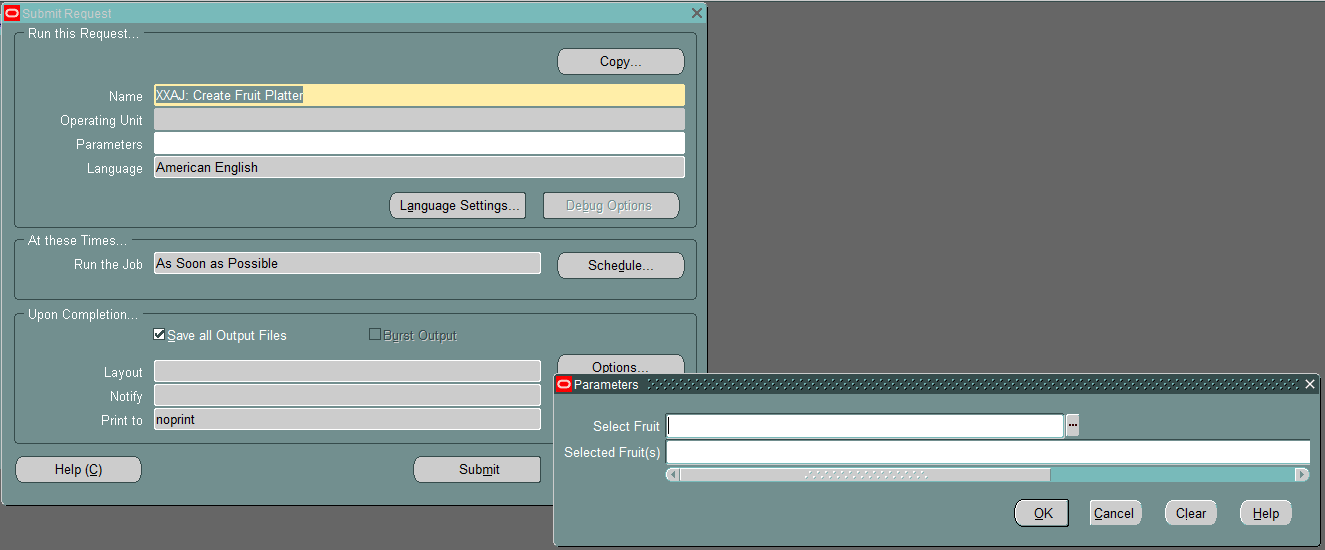
Now we can see how this works when you try to submit the job.


Select one value 'Apple' from the first parameter.


Select another value 'Orange' from the first paramater.


Now if you really interested in this solution, create a program as above and try to select 'Clear'. Then you can see how that works :)


From the program log, you can see that you have got the comma separated values inside the program. Now you use just PLSQL code to extract the individual values as use it as per your requirement.


Few points which you might be interersted in :

  • User can modify the list before submitting. If they want to remove one specific value , they could just modify the value in the second parameter before submitting.
  • If you don't want user to modify the second parameter manually, just remove the 'Display' property from the second parameter in the concurrent program definition.
  • If the list is too big and the values exceeds 240 Characters, then try to pass a code  with lesser characters instead of the full value and then translate that in the code.
  • You could also add a new parameter called, remove list, so that user can select from this list to remove a value selected by mistake.

The package code with the variable declaration is given below:

Package Spec:

 CREATE OR REPLACE PACKAGE xxaj_fruit_platter_pkg AS  
  PROCEDURE create_platter(x_errbuf      OUT VARCHAR2  
                          ,x_retcode     OUT VARCHAR2  
                          ,p_dummy_fruit IN  VARCHAR2  
                          ,p_fruit_list  IN  VARCHAR2);  
  FUNCTION get_selected_list(p_fruit VARCHAR2)  
  RETURN VARCHAR2;  
 END xxaj_fruit_platter_pkg;  

Package Body:

 CREATE OR REPLACE PACKAGE BODY xxaj_fruit_platter_pkg AS  
  --Package level variable which holds the value  
  v_selected_list VARCHAR2(1000);  
  PROCEDURE create_platter (x_errbuf      OUT VARCHAR2  
                           ,x_retcode     OUT VARCHAR2  
                           ,p_dummy_fruit IN  VARCHAR2  
                           ,p_fruit_list  IN  VARCHAR2)  
  IS  
  BEGIN  
   --This will have the last selected fruit. Just ignore it :)  
   fnd_file.put_line(fnd_file.log ,'p_dummy_fruit : '|| p_dummy_fruit);   
   fnd_file.put_line(fnd_file.log ,'p_fruit_list  : '|| p_fruit_list);   
  END create_platter;  
  FUNCTION get_selected_list(p_fruit VARCHAR2)  
  RETURN VARCHAR2  
  IS  
  BEGIN  
    IF p_fruit = 'Clear' THEN  
     v_selected_list := NULL;  
    ELSE   
     --Concatenate the selected value to the existing list  
     SELECT NVL2(v_selected_list,v_selected_list ||',',v_selected_list) || p_fruit   
     INTO v_selected_list   
     FROM dual;  
    END IF;  
      
    RETURN v_selected_list;  
  END get_selected_list;  
 END xxaj_fruit_platter_pkg;  

If there is anything which you think will be an issue in the above solution, feel free to post a comment below.


Feel free to point out if anything is missing/wrong in this blog.


Monday, 15 June 2020

Oracle Apps: How to create validation for a date parameter using a value set for Oracle Concurrent Program

One of my colleague was looking for a solution to restrict a date parameter on a concurrent program not to allow future dates.This post is to just show how to do that as it could help someone else as well.

Step 1. 
Create a Special Value set as below


Format Type     : Standard Date
Validation Type : Special
 Event                : Validate
 
FND PLSQL "
DECLARE
  v_date DATE:= :!VALUE;
BEGIN
  IF v_date > SYSDATE THEN
    FND_MESSAGE.SET_NAME('FND','FND_GENERIC_MESSAGE');
    FND_MESSAGE.SET_TOKEN('MESSAGE','Please choose current or past date.');
    FND_MESSAGE.RAISE_ERROR;
  END IF;
END;
"
 
Step 2.
Attach this value set to the Concurrent Program Parameter.


Now try to enter a future date parameter while submitting the concurrent program.


Feel free to point out if anything is wrong/missing in this post


Tuesday, 2 February 2016

Oracle Apps: Helpful Queries on Concurrent Programs / Concurrent Requests

The intention if this post is to post some of the queries which will be helpful when querying on Concurrent Programs / Request.

#1. Query to find the Run Timing for the Concurrent Request.
select fcr.request_id  
      ,fcp.user_concurrent_program_name  
      ,fcp.concurrent_program_name  
      ,fcr.request_date  
      ,fcr.actual_start_date  
      ,fcr.actual_completion_date  
      ,(  
        (floor(((fcr.actual_completion_date - fcr.actual_start_date)*24))      || 'hr ') ||  
        (floor(((fcr.actual_completion_date - fcr.actual_start_date)*24*60))   || 'min ')||  
        (round(((fcr.actual_completion_date - fcr.actual_start_date)*24*60*60))|| 'sec')  
       ) duration  
      ,fcr.status_code  
      ,flvs.meaning status  
      ,fcr.phase_code  
      ,flvp.meaning phase  
      ,fcr.completion_text  
      ,fcr.argument_text  
      ,fcr.logfile_name  
      ,fcr.outfile_name  
from apps.fnd_concurrent_programs_vl fcp  
    ,apps.fnd_concurrent_requests    fcr  
    ,apps.fnd_lookup_values          flvs  
    ,apps.fnd_lookup_values          flvp  
where fcr.concurrent_program_id = fcp.concurrent_program_id(+)  
and   flvs.lookup_code          = fcr.status_code  
and   flvs.lookup_type          = 'CP_STATUS_CODE'  
and   flvs.language             = 'US'  
and   flvs.view_application_id  = 0  
and   flvp.lookup_code          = fcr.phase_code  
and   flvp.lookup_type          = 'CP_PHASE_CODE'  
and   flvp.language             = 'US'  
and   flvp.view_application_id  = 0;  

#2. Query to find the details of the Scheduled Concurrent Requests & Request Sets including the programs under the Request Set.
select request_id  
      ,conc_prog_name  
      ,params  
      ,prog_schedule_type  
      ,prog_schedule  
      ,user_name  
      ,requested_start_date   
 from (  
    select fcr.request_id  
          ,1 seq  
          ,decode(fcpt.user_concurrent_program_name,  
                  'Report Set','Report Set:' || fcr.description,  
                  fcpt.user_concurrent_program_name) conc_prog_name  
          ,(fcr.argument1||','||fcr.argument2||','||fcr.argument3||','||fcr.argument4||','||fcr.argument5||','||  
            fcr.argument6||','||fcr.argument7||','||fcr.argument8||','||fcr.argument9||','||fcr.argument10) params -- Add more parameters if needed or use column 'argument_text'  
          ,nvl2(fcr.resubmit_interval,'Periodically',nvl2(fcr.release_class_id, 'On Specific Days', 'Once')) prog_schedule_type  
          ,(case nvl2(fcr.resubmit_interval,'PERIODICALLY',nvl2(fcr.release_class_id, 'ON SPECIFIC DAYS', 'ONCE'))  
                 when 'PERIODICALLY'  
                     then 'EVERY ' || fcr.resubmit_interval || ' ' || fcr.resubmit_interval_unit_code || ' FROM ' ||fcr.resubmit_interval_type_code || ' OF PREV RUN'  
                 when 'ONCE'  
                     then 'AT :' ||to_char(fcr.requested_start_date, 'DD-MON-YYYY HH24:MI')  
                 else  
                     'EVERY: ' || fcrc.class_info  
            end) prog_schedule  
          ,fu.user_name user_name  
          ,to_char(fcr.requested_start_date, 'DD-MON-YYYY HH24:MI') requested_start_date  
     from apps.fnd_concurrent_programs_tl fcpt  
         ,apps.fnd_concurrent_requests    fcr  
         ,apps.fnd_user                   fu  
         ,apps.fnd_conc_release_classes   fcrc  
     where fcpt.application_id        = fcr.program_application_id  
     and   fcpt.concurrent_program_id = fcr.concurrent_program_id  
     and   fcr.requested_by           = fu.user_id  
     and   fcr.phase_code             = 'P'  
     and   fcr.requested_start_date   > sysdate  
     and   fcpt.language              = 'US'  
     and   fcrc.release_class_id(+)   = fcr.release_class_id  
     and   fcrc.application_id(+)     = fcr.release_class_app_id  
     union  
     select fcr.request_id  
           ,2 seq  
           ,'-->' || fcp.user_concurrent_program_name conc_prog_name  
           ,(frr.argument1||','||frr.argument2||','||frr.argument3||','||frr.argument4||','||frr.argument5||','||  
             frr.argument6||','||frr.argument7||','||frr.argument8||','||frr.argument9||','||frr.argument10) params -- Add more parameters if needed  
           ,null prog_schedule_type  
           ,null prog_schedule  
           ,null user_name  
           ,null requested_start_date  
     from apps.fnd_concurrent_programs_tl fcpt
         ,apps.fnd_concurrent_requests    fcr
         ,apps.fnd_user                   fu
         ,apps.fnd_conc_release_classes   fcrc  
         ,apps.fnd_run_requests           frr
         ,apps.fnd_concurrent_programs_tl fcp  
     where fcpt.application_id               = fcr.program_application_id  
     and   fcpt.concurrent_program_id        = fcr.concurrent_program_id  
     and   fcr.requested_by                  = fu.user_id  
     and   fcr.phase_code                    = 'P'  
     and   fcr.requested_start_date          > sysdate  
     and   fcpt.language                     = 'US'  
     and   fcrc.release_class_id(+)          = fcr.release_class_id  
     and   fcrc.application_id(+)            = fcr.release_class_app_id  
     and   fcpt.user_concurrent_program_name = 'Report Set'  
     and   frr.parent_request_id             = fcr.request_id  
     and   frr.concurrent_program_id         = fcp.concurrent_program_id  
 ) qrslt  
 order by request_id,seq;  


Feel free to point out if anything is missing/wrong in this blog.

Friday, 27 March 2015

Oracle Apps: How to delete a concurrent program in Oracle eBusiness

You cannot delete a concurrent program from the front-end. You can only disable it.


If you want to delete the concurrent program and the executable (if needed) programatically using the below code.

 begin  
 fnd_program.delete_program('CONC_PROG_SHORT_NAME'  
                         ,'APPLICATION_SHORT_NAME');  
 fnd_program.delete_executable('EXECUTABLE_SHORT_NAME'  
                           ,'APPLICATION_SHORT_NAME');  
 COMMIT;  
 end;   

Feel free to point out if anything is missing/wrong in this blog.