Showing posts with label OAF. Show all posts

Wednesday, 28 October 2020

OAF: How to default current date time into a MessageDateFieldBean in Controller

This post is to show how we can default the current date time to a MessageDateFieldBean in OA framework page, where the field is not mapped to a View Object. If the field is mapped to a ViewAttribute in a View Object, we could just set the value to the ViewAttribute and it will get defaulted in the bean, when the page loads.

We need to make sure that the format matches the user's date preference set as well.

We could use OANLSServices class to acheive this.

Get the current date using java.util.Date. Pass that as an input to OANLSServices.dateTimeToString. This will return the date value in the current user preference format.

Sample Code which can be used in the processRequest function.

 //get the handle to the date field bean  
 OAMessageDateFieldBean dateFieldBean = (OAMessageDateFieldBean)webBean.findChildRecursive("CurrentDate");  
 pageContext.writeDiagnostics(this, "dateFieldBean :" + dateFieldBean, 4);  
 if (dateFieldBean != null)  
 {  
       // Get the current date  
       java.util.Date utilDate = new java.util.Date();  
       //Convert the date value into users date format  
       String dateStr = pageCtxt.getOANLSServices().dateTimeToString(utilDate);  
       pageContext.writeDiagnostics(this, "dateStr :" + dateStr, 4);  
       //set the value to the datefield bean  
       dateFieldBean.setValue(pageContext,dateStr);  
 }  

The above code will take care of the date format set in the user preferences.

Date Format set to dd-MMM-yyyy

Output
Date Format set to yyyy/MMM/dd


Output


Feel free to point out if anything is missing/wrong in this blog.

Sunday, 23 August 2015

OAF: OAMessageChoice / poplist / dropdown not refreshing the data

Sometimes when we use the MessageChoice /poplist / dropdown in our page and we want to see different data everytime the page loads. The example screnarios are 
  • Data has to be different based on the user logged in.
  • Data has to be different based on the responsibility used to access the page. 
  • Dropdown has to list the newly added data from the previous session or by a different user just before this page is accessed.
The poplist data object that OA Framework creates the first time, is cached in the JVM and reused until you explicitly disable caching. The caching is enabled by default. So, if you are looking for a fix for data not refreshing in your dropdown/poplist, you need to disable the poplist caching explicitly using the below API in processRequest() method of your controller.

poplistBean.setPickListCacheEnabled(false);

Example usage :
 import oracle.apps.fnd.framework.webui.beans.message.OAMessageChoiceBean;  
 OAMessageChoiceBean poplistBean = (OAMessageChoiceBean)webBean.findChildRecursive("<MessageChoice_Field_Name>");  
 poplistBean.setPickListCacheEnabled(false);  

From the Dev Guide :

You should explicitly disable poplist caching in the following cases:
  1. When you use the view object row getter method to encrypt the value for a poplist.
The poplist data object that OA Framework creates the first time is cached in the JVM and reused until you explicitly disable caching. When you encrypt the value of a poplist in the view object row getter method, the encrypt method uses the current Oracle E-Business Suite user session ID as a key to encrypt the poplist value. When you decrypt the values in their controller to further process the poplist, the decrypt method will also use the current Oracle E-Business Suite user session ID as the key to decrypt the value.
Since the poplist data object is cached at a JVM level, the data object will always contain the cached value with the encryption done with the first Oracle E-Business Suite user session ID and will reuse that value to render the poplist. Since the decrypt method also uses the current Oracle E-Business Suite user session ID as the key and the encrypted value that is returned is a cached value, the decrypt method will fail and return a null value. To avoid this scenario, you should always disable poplist caching when you encrypt the poplist values in their view object row getters.
2. When the poplist data (the query string or WHERE clause parameters of the poplist view object) keeps changing with user or thread-specific context.
Only data that can be shared across user threads within the JVM should be stored in the cache. Otherwise, the cache size increases redundantly, thereby increasing memory consumption.


Feel free to point out if anything is missing/wrong in this blog.

Thursday, 2 July 2015

OAF: How to add logging / debug messages in Oracle Application Framework

In this post I will explain how to write log / debug statements in Controller (CO), Application Module Implementation class(AM), ViewObject and ViewObject Row Implementation class (VO) and Entity Object Implementation class (EO) in OA Framework.

OA Framework has a method writeDiagnostics() which can be used from anywhere in the above mentioned classes. This methods are published by oracle.apps.fnd.framework.webui.OAPageContext and oracle.apps.fnd.framework.server.OADBTransaction (for example, if you want to make logging calls in a UI controller, use OAPageContext. If you want to make logging calls from an application module, use OADBTransaction).  Below give are the example to show how to call these methods in different places.


To view log mesages, select the Diagnostics global button from any page (this global button is configured as part of the standard global menu added to each page; the display of this menu item is controlled by the profile option FND: Diagnostics (FND_DIAGNOSTICS)) 

Diagnostics can be enabled at various levels:
  • Show Log - directs you to the Oracle Applications Manager where you can view a "snapshot" of your Oracle E-Business Suite system.
  • Show Log on Screen - allows you to specify a log level and display Java log messages for a particular HTTP Request-Response at the end of the current page. For additional information about this feature, refer to the section titled "Using Logging to Screen" in the Oracle Application Framework Developer's Guide chapter called How to Configure Logging of the Oracle E-Business Suite Supportability Guide, available on the Applications Release 12 Online Documentation CD.
  • Set Trace Level - displays the Set Trace page where you can specify the level of information to collect in a database trace. 
  • Show Pool Monitor - displays the Application Pool Monitor where you view different aspects of runtime and configuration information about the JVM.
Here we are discussing only about the option "Show Log on Screen".

The debug messages can be written in various level:

  • Statement (1)
  • Procedure(2)
  • Event(3)
  • Exception (4)
  • Error (5)
  • Unexpected(6)
Depends on which options you choose, the screen will display all the debug messges written on that level or above. I prefer to write the debug messages at the exception level, so if I select the option Exception(4) in the screen, i can see only my debug messages.(most of the standard logging statements are written at Statement(1) level.)
  • From a Controller
 if(pageContext.isLoggingEnabled(OAFwkConstants.EXCEPTION))  
 {  
      pageContext.writeDiagnostics(this,"[TestCO]processRequest():- <Log Message Here!!!!!!>",OAFwkConstants.EXCEPTION);  
 }  
  • From AM Impl class
 if(this.isLoggingEnabled(OAFwkConstants.EXCEPTION))   
 {  
      this.writeDiagnostics(this,"[TestAMImpl]testMethod():- <Log Message Here!!!!!!>",OAFwkConstants.EXCEPTION);  
 }  
  • From VOImpl class
 if(this.isLoggingEnabled(OAFwkConstants.EXCEPTION))   
 {  
      this.writeDiagnostics(this,"[TestVOImpl]testMethod():- <Log Message Here!!!!!!>",OAFwkConstants.EXCEPTION);  
 }  
  • From VORow Impl class
 import oracle.apps.fnd.framework.server.OAApplicationModuleImpl;  
 OAApplicationModuleImpl appModule = (OAApplicationModuleImpl)this.getApplicationModule();  
 if(appModule.isLoggingEnabled(OAFwkConstants.EXCEPTION))   
 {  
      appModule.writeDiagnostics(this,"[TestVORowImpl]testMethod():- <Log Message Here!!!!!!>",OAFwkConstants.EXCEPTION);  
 }  
  • From EOImpl class
 import oracle.apps.fnd.framework.server.OADBTransaction;  
 OADBTransaction transaction = this.getOADBTransaction();  
 if(transaction.isLoggingEnabled(OAFwkConstants.EXCEPTION))   
 {  
      transaction.writeDiagnostics(this,"[TestEOImpl]testMethod():- <Log Message Here!!!!!!>",OAFwkConstants.EXCEPTION);  
 }  
If you are running from Jdeveloper, you could just use the SOP statements.
 System.out.println("[TestCO]processRequest():- <Error Message Here!!!!!!>");  

This is a custom method which I normally use, which is helpful when you want to change the debug levels. This is used in CO, if you want you can write something similar in AM :)
 public void writeLog(OAPageContext pageContext, String message)   
 {  
      if(pageContext.isLoggingEnabled(OAFwkConstants.EXCEPTION))  
      {  
           pageContext.writeDiagnostics(this,message,OAFwkConstants.EXCEPTION);  
      }  
      System.out.println(message);  
 }  


Related Links: Logging in OAF Pages – A Technical Note!


Feel free to point out if anything is missing/wrong in this blog.

Sunday, 14 June 2015

OAF: How to invoke Javascript in Oracle Applications Framework

In this post, I will show few options to invoke javascript from OA Framework pages.

Before showing the options, I will just copy paste the note relating to javascript from the OAF Developer Guide.

"UIX and the OA Framework are rapidly adding new features to provide a more interactive user experience (partial page rendering, automatic table totaling, and so on). You are certainly encouraged to leverage these features as they are released, however, you should not attempt to implement them yourself before they're ready. 

As a customer, you may add your own Javascript code to OA Framework applications through controller customizations using setter methods for Javascript events that are exposed on form web beans such as check boxes, text inputs, and so on. However, as with any customization, Oracle does not support or entertain bugs on such custom Javascript usage. As a customer, it is your responsibility to certify your custom Javascript code, ensuring that it does not break the functionality of the page and is compliant with usability, security and browser standards."

  • Specify the javascript code directly on the bean.
In the below example I have specified a javascript alert on the onLoad event of the OABodyBean.
 OABodyBean bodyBean = (OABodyBean) pageContext.getRootWebBean();  
 String javaScriptStr = "javascript:alert('Javascipt invoked on PageLoad');";  
 bodyBean.setOnLoad(javaScriptStr);  

  • Attach the javascript function into the page using a RawTextBean.
We create a OARawTextBean in the page declaratively/programmatically and attach a javascript method as the Text property of the Bean. You can attach any number of javascript functions.Then you can call the methods in that anywhere in the page. In the below example I am calling the js function from a Button click.
 String jsStr = "<script>                                          "+  
                "    function submitCustomOnClick()                "+  
                "    {                                             "+  
                "       alert('Custom On Click invoked [RawText]');"+  
                "    }                                             "+  
                "</script> " ;  
 OARawTextBean rawTextBean = (OARawTextBean)createWebBean(pageContext, "RAW_TEXT", null, null);  
 rawTextBean.setText(jsStr);  
 webBean.addIndexedChild(rawTextBean);
  
 OAButtonBean buttonBean = (OAButtonBean)webBean.findChildRecursive("jsButton");  
 buttonBean.setOnClick("submitCustomOnClick();");  


  • Attach the javascript function into the page using putJavaScriptFunction() method.
You can attach one javascript function to the page using this function. Once added to the page, you can call from any bean in the page.
 String customJSFunction = "function customJSFunc(){ alert('Custom On Click invoked [putJavaScriptFunction]'); }";  
 pageContext.putJavaScriptFunction("customJSFunc",customJSFunction);
  
 OAButtonBean buttonBean = (OAButtonBean)webBean.findChildRecursive("jsButton");  
 buttonBean.setOnClick("customJSFunc();");  


  • Create a .js file and attach the file to the page using putJavaScriptLibrary() method.
If you need to use many javascript functions, or you want to use same function in multiple pages, then you can create a .js file and put all the functions inside this file. You need to place this file under $OA_HTML. You can create a subfolder inside the $OA_HTML and put the file(s) inside that. You can then specify the file using the putJavaScriptLibrary() function.

The above file CustomJavaScript.js placed in a folder called customJS under $OA_HTML.
 pageContext.putJavaScriptLibrary("CustomJSLibs", "customJS/CustomJavaScript.js");  
 OAButtonBean buttonBean = (OAButtonBean)webBean.findChildRecursive("jsButton");  
 buttonBean.setOnClick("methodFromJSFile();");  


  • You can also call javascript using the setAttributeValue, ex :- ON_CLICK_ATTR
 OAButtonBean buttonBean = (OAButtonBean)webBean.findChildRecursive("jsButton");  
 buttonBean.setAttributeValue(oracle.cabo.ui.UIConstants.ON_CLICK_ATTR, "alert('Custom On Click invoked [ON_CLICK_ATTR]');" );  


Feel free to point out if anything is missing/wrong in this blog

Friday, 12 June 2015

OAF: How to Capture LOV event in Oracle Application Framework

In this post I will show a sample code to capture the LOV event in processFormRequest of controller in OA Framework.

To get the source LOV ID, you could use 2 methods.

  • pageContext.getLovInputSourceId();(This method cannot be used to get the lovInputsourceId, if the LOV is inside a table/advancedTable region and you want to use this value to get the return Items using getLovResultsFromSession() .) 
  • pageContext.getParameter(SOURCE_PARAM);(This method will not return the exact lov Id when the lov is placed inside a table/advanced table region. Refer the last section for details.)


To handle the lov event (IdLov) in the above page structure, use the below code:
 if(pageContext.isLovEvent())  
 {  
      String lovInputSourceId = pageContext.getLovInputSourceId();  
      if("IdLov".equals(lovInputSourceId)) {  
           System.out.println("Inside isLovEvent of IdLov");  
      }  
 }  

If you want to get the return values from the lov (if the lov is not inside a table/advancedTable) you can use the below code. If the lov is inside table/advancedTable, Refer the last section.
 import java.util.Hashtable;  
 import java.util.Enumeration;  
 if(pageContext.isLovEvent())  
 {   
      String lovInputSourceId = pageContext.getLovInputSourceId();  
      if("IdLov".equals(lovInputSourceId)) {  
           System.out.println("Inside isLovEvent of IdLov");  
           Hashtable lovResults = pageContext.getLovResultsFromSession(lovInputSourceId);  
           if(lovResults!=null)  
           {  
                String userId =(String)lovResults.get("IdLov"); // "IdLov" is the Return Item specified in the lovMap  
                System.out.println("userId:" + userId);  
                  
                // To get all the Return Values the below code can be used
                Enumeration e = lovResults.keys();  
                while (e.hasMoreElements()) {  
                     String key  = (String) e.nextElement();  
                     String value = (String)lovResults.get(key);  
                     System.out.println(key + " : " + value);  
                }  
           }  
      }  
 }  

If you need to handle specific events on the LOV, the following options are also available.

When you enter a correct value in the Lov and tab out, the lov Windows will not popup. The above code works fine in this scenario. Along with that there is one more event which gets fired  'lovValidate'.
 if(pageContext.isLovEvent())  
 {   
      String lovEvent = pageContext.getParameter(EVENT_PARAM);  
      if("lovValidate".equals(lovEvent)) {  
           String lovInputSourceId = pageContext.getLovInputSourceId();  
           if("IdLov".equals(lovInputSourceId)) {  
                System.out.println("Inside isLovEvent of IdLov");  
           }  
      }  
 }  

When you click on the torch icon, the isLovEvent() returns false. But to handle this event you can use 'lovPrepare'.
 if("lovPrepare".equals(lovEvent)) {  
      String lovInputSourceId = pageContext.getLovInputSourceId();  
      if("IdLov".equals(lovInputSourceId)) {  
           System.out.println("Inside Lov Prepare of IdLov");  
      }  
 }  

When you select a value from the LOV popup, 'lovUpdate' event gets fired. isLovEvent() returns true in this case.
 if(pageContext.isLovEvent())  
 {   
      String lovEvent = pageContext.getParameter(EVENT_PARAM);  
      if("lovUpdate".equals(lovEvent)) {  
           String lovInputSourceId = pageContext.getLovInputSourceId();  
           if("IdLov".equals(lovInputSourceId)) {  
                System.out.println("Inside isLovEvent of IdLov");  
           }  
      }  
 }  

If the LOV is inside a table/advancedTable region the SOURCE_PARAM will return <region>:<lov_Item_id>:<row_num>.This is because the uniqueId of the field gets generated dynamically when the page gets loaded.  
 if(pageContext.isLovEvent())  
 {   
      String lovInputSourceId = pageContext.getParameter(SOURCE_PARAM);
      // In this example lovInputSourceId comes as 'AdvancedTableRN:EmailLov:0'
      if(lovInputSourceId != null && lovInputSourceId.contains(":EmailLov:")) {  
           System.out.println("Inside isLovEvent of EmailLov from AdvancedTable");  
      }
      lovInputSourceId = pageContext.getLovInputSourceId();
      // In this example lovInputSourceId comes as 'EmailLov'  
 }  

If you want to get the return values from the lov when the lov is inside a table/advancedTable, you can use the below code. This code will work for the normal lov also. 
 import java.util.Hashtable;  
 import java.util.Enumeration;  
 if(pageContext.isLovEvent())  
 {   
      String lovInputSourceId = pageContext.getLovInputSourceId();  
      if("EmailLov".equals(lovInputSourceId)) {  
           System.out.println("Inside isLovEvent of EmailLov from AdvancedTable");  
           Hashtable lovResults = pageContext.getLovResultsFromSession(pageContext.getParameter(SOURCE_PARAM));  
           if(lovResults!=null)  
           {  
                String emailAddress =(String)lovResults.get("EmailLov"); // "EmailLov" is the Return Item specified in the lovMap  
                System.out.println("emailAddress:" + emailAddress);  
                  
                // To get all the Return Values the below code can be used
                Enumeration e = lovResults.keys();  
                while (e.hasMoreElements()) {  
                     String key  = (String) e.nextElement();  
                     String value = (String)lovResults.get(key);  
                     System.out.println(key + " : " + value);  
                }  
           }  
      }  
 }  


Feel free to point out if anything is missing/wrong in this blog.

Wednesday, 10 June 2015

OAF: Exception in thread "main" java.lang.NoClassDefFoundError: oracle/dms/console/DMSConsole

When we try to import a file into Oracle Apps R12.2.4 using the import script which comes with the Jdeveloper 10.1.3.5.0, it is throwing an error message as below:

 Exception in thread "main" java.lang.NoClassDefFoundError: oracle/dms/console/DMSConsole  
     at oracle.jdbc.driver.DMSFactory.<clinit>(DMSFactory.java:51)  
     at oracle.jdbc.driver.PhysicalConnection.createDMSSensors(PhysicalConnection.java:3821)  
     at oracle.jdbc.driver.PhysicalConnection.<init>(PhysicalConnection.java:632)  
     at oracle.jdbc.driver.T4CConnection.<init>(T4CConnection.java:230)  
     at oracle.jdbc.driver.T4CDriverExtension.getConnection(T4CDriverExtension.java:34)  
     at oracle.jdbc.driver.OracleDriver.connect(OracleDriver.java:567)  
     at java.sql.DriverManager.getConnection(DriverManager.java:582)  
     at java.sql.DriverManager.getConnection(DriverManager.java:207)  
     at oracle.adf.mds.tools.util.ConnectUtils.getDBConnection(ConnectUtils.java:166)  
     at oracle.jrad.tools.xml.importer.XMLImporter.importDocuments(XMLImporter.java:232)  
     at oracle.jrad.tools.xml.importer.XMLImporter.main(XMLImporter.java:88)  
 Caused by: java.lang.ClassNotFoundException: oracle.dms.console.DMSConsole  
     at java.net.URLClassLoader$1.run(URLClassLoader.java:202)  
     at java.security.AccessController.doPrivileged(Native Method)  
     at java.net.URLClassLoader.findClass(URLClassLoader.java:190)  
     at java.lang.ClassLoader.loadClass(ClassLoader.java:307)  
     at sun.misc.Launcher$AppClassLoader.loadClass(Launcher.java:301)  
     at java.lang.ClassLoader.loadClass(ClassLoader.java:248)  
     ... 11 more  

Cause:
The jar file which has the oracle.dms.console.DMSConsole is not getting set in the class path.

I tried to set this jar file in the class path using the CLASSPATH environment variable (in several ways), but didn't get it working. Finally I modified the import.bat file and it worked. So I will mention the steps here.

Fix:

Open the import.bat file which is available under C:\.....\jdevbin\oaext\bin\import.bat.
Modify the below line  (line no: 121)
 set CLASSPATH=%JRAD_ROOT%\jdev\appslibrt\ebsuix.jar  
to
 set CLASSPATH=%JRAD_ROOT%\jdev\appslibrt\ebsuix.jar;%JRAD_ROOT%\lib\dms.jar  

Save the file and try the import again. 

Note:- If it didn't work, just try to restart the machine and try again.

Related blog: OAF: Import/Export Page/Personalization/Substitution using XMLImporter/JPXImporter in Oracle Application Framework

Feel free to point out if anything is missing/wrong in this blog.

Saturday, 6 June 2015

OAF: How to create a PVO and use that for Spel Binding in Oracle Application Framework

In this post I will give an example to show how to create a PVO ("Application Properties" View Object) and use the attributes to change the properties of the bean dynamically. I will give same method to set the PVO Attribute values. This method can be used when there is only 1 attribute to be set or if there are multiple attributes.

Scenario:
I have created 2 tables in the page (say Table1 and Table2). I need to show Table1 when the page loads and hide Table2. Based on some conditions, I will need to change the Tables in screen dynamically. 


  • Create a PVO with 2 attributes (1 for each table). Set the value of the attribute appropirately.
  • Use Spel binding to associate the attribute to the table. Refer: OAF: Spel Binding

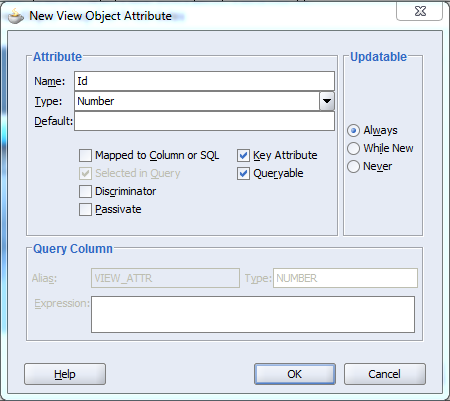
Create PVO with 2 attributes (I have created one additional Id column also, which can be set as the Key Attribute). Make sure that you set the Updatable property to 'Always'.


Add this VO to the Application Module and then add the below methods in the AMImpl.

 import oracle.jbo.domain.Number;  
 public void intializeXXCustomPVO()  
 {  
      OAViewObjectImpl xxCustomPVO = getXXCustomPVO1();  
      if(xxCustomPVO.getRowCount() == 0 )  
      {  
           Row xxCustomPVORow = xxCustomPVO.createRow();  
           xxCustomPVORow.setNewRowState(Row.STATUS_INITIALIZED);        
           xxCustomPVORow.setAttribute("Id",new Number(-1));  
           xxCustomPVO.insertRow(xxCustomPVORow);  
      }  
 }  

 public void setXXCustomPVOValues(String[] name,String[] val)  
 {  
      OAViewObjectImpl xxCustomPVO = getXXCustomPVO1();  
      xxCustomPVO.setRangeSize(-1);  
      Row row = xxCustomPVO.getRowAtRangeIndex(0);  
      for(int i = 0; i < name.length; i ++)  
      {  
           if("Y".equals(val[i]))  
           {  
                row.setAttribute(name[i],Boolean.TRUE);  
           }  
           else  
           {  
                row.setAttribute(name[i],Boolean.FALSE);  
           }  
      }  
 }  
Write the below code in the processRequest of the Controller. This will create a Row in the PVO and initialize the PVO attributes.
 import java.io.Serializable;  
 import oracle.apps.fnd.framework.server.OAApplicationModuleImpl;  
 OAApplicationModuleImpl appModule = (OAApplicationModuleImpl)pageContext.getApplicationModule(webBean);  
 appModule.invokeMethod("intializeXXCustomPVO");
  
 String[] name = {"RenderAttr1","RenderAttr2"};  
 String[] val  = {"Y","N"};
  
 Serializable[] params = {name, val};  
 Class[] paramTypes    = {String[].class, String[].class};
  
 appModule.invokeMethod("setXXCustomPVOValues", params, paramTypes);  

Write the below code in the
processFormRequest based on your condition.Change the values of the val[] appropriately, based on your use case.
 OAApplicationModuleImpl appModule = (OAApplicationModuleImpl)pageContext.getApplicationModule(webBean);
  
 String[] name = {"RenderAttr1","RenderAttr2"};  
 String[] val  = {"N","Y"};
  
 Serializable[] params = {name, val};  
 Class[] paramTypes    = {String[].class, String[].class};
  
 appModule.invokeMethod("setXXCustomPVOValues", params, paramTypes);  

You can use the below syntax to set the Rendered property of the bean.
   ${oa.XXCustomPVO1.RenderAttr1}

   ${oa.XXCustomPVO1.RenderAttr2}


Feel free to point out if anything is missing/wrong in this blog.

Wednesday, 3 June 2015

OAF: Issues associated with VO Substitution in Oracle Applications Framework - Part2

In this post I will explain the fix for some other issues associated with VO Substitution in Oracle Application Framework.

This is the continuation of my other blogs on the VO Substitution issues:
OAF: Issues associated with VO Substitution in Oracle Applications Framework - Part1
OAF: Transient Attributes not getting populated in Extended VO


Sample errors:
## Detail 0 ## java.sql.SQLException: Attempt to set a parameter name that does not occur in the SQL: INVOICE_ID

## Detail 0 ## java.sql.SQLSyntaxErrorException: ORA-01722: invalid number

Reference of errors :
https://community.oracle.com/thread/3729150
https://community.oracle.com/thread/3727660


Fix:
Change the Binding Style of VO from 'Oracle Named' to 'Oracle Positional'.


Refer the below link for more details about the Named and Positional bindings.
Binding and Defining


Feel free to point out if anything is missing/wrong in this blog.

Tuesday, 2 June 2015

OAF: EL (Expression Language)


Prior to Release 12.2, EL support was referred to as SPEL (Simplest Possible Expression Language) support, which included a subset of the currently supported EL types and EL-supporting properties.
You could find more details of SPEL in my other blog: OAF: Spel Binding

The below details are from the OA Framework Developer's Guide 12.2.3 : Oracle Application Framework Developer's Guide Release 12.2.3 (Doc ID 1593765.1)

EL Types
${oa.<ViewInstance>.<ViewAttr>}
Evaluates to <ViewInstance>.getAttribute("<ViewAttr>").
${oa.current.<ViewAttr>}
Evaluates to <ViewInstance_attached_to_the_bean>.getAttribute("<ViewAttr>").
${oa.encrypt.<ViewInstance>.<ViewAttr>}
Returns the encrypted value of the <ViewInstance>.getAttribute("<ViewAttr>") statement.
${oa.FunctionSecurity.<FunctionName>}
Returns true or false depending on whether FunctionName is granted to the current user.
${oa.request.<paramName>}
Evaluates to pageContext.getParameter("<paramName>").
${oa.session.<paramName>}
Evaluates to pageContext.getSessionValue("<paramName>").
${oa.sessiondirect.<paramName>}
Evaluates to pageContext.getSessionValueDirect("<paramName>").
${oa.txn.<paramName>}
Evaluates to pageContext.getTransactionValue("<paramName>").
${oa.txntrans.<paramName>}
Evaluates to pageContext.getTransactionTransientValue("<paramName>").
${oa.pageContext.<methodName>}
Evaluates to pageContext.<methodName>().
Note: Only public methods without parameters may be invoked using this EL syntax.
${oa.class.<className>.<methodName>}
Invokes the method in the specified class.
Notes:
• Provide <className> as a fully qualified class name.
• The class must have a no-argument (zero argument) constructor.
• Only public methods without parameters may be invoked using this EL expression.

Usage Notes:
  • Use oa.boolean.false or oa.boolean.true to represent Boolean.FALSE or Boolean.TRUE, respectively.
  • For the negation or ! (NOT) operator, use oa.boolean.false, as in the example,  ${oa.session.isItemRendered == oa.boolean.false}.
  • For an EL expression:
    • You may only specify a static numeric value.
    • Use ${oa.text.<TEXT>} to represent a string.
    • Use oa.boolean.false or oa.boolean.true to represent a Boolean.
Sample Usage:

  • ${oa.session.param1 == oa.request.param1}
  • ${oa.session.paramLength + ( oa.request.fieldLength * 2 ) }
  • ${oa.session.isItemRendered == oa.boolean.false}

Combining Static Text with EL
Use the syntax ${oa.text.<TEXT>} to prepend or append static text to an EL expression.

Usage Notes
  • Warning: If you append static text to an EL expression, be aware that the static text will not get translated and the order of the text may vary depending on the language.
  • You may append text to an EL expression in any order, as shown in these examples, where ${EL} represents any valid EL type:
    • ${oa.text.<TEXT>} + ${EL}
    • ${EL} + ${oa.text.<TEXT>} + ${EL}
Sample Usage
  • ${oa.text.Welcome Mr.} + ${oa.EmpVO.Empname}

Feel free to point out if anything is missing/wrong in this blog.

OAF: Spel Binding

Simplest Possible Expression Language (SPEL) - An industry-standard expression language included in the JSP Standard Tag Library (JSTL)

For selected properties, OA Framework supports the use of SPEL expressions to quickly bind the property to an underlying data source that provides the property's value. For example, you could bind the Rendered property of a button to a view object attribute to ascertain whether it should be hidden or shown when the page renders.

The SPEL syntax for this property looks like:
   ${oa.<ViewInstanceName>.<ViewAttributeName>}
       
      eg:-  ${oa.XXViewObject1.ViewAttrName}

If you are working with a table-in-table or HGrid that uses view links, you need to modify your SPEL syntax as shown: ${oa.current.viewAttrName}. The inclusion of current keyword lets you say "get the value from whatever row BC4J is using to render the current row" since you won't know how to access the view objects and row sets created dynamically for these complex components.

To add a VOAttribute value in a link 
eg: OA.jsp?OAFunc=XXX_FUNC&VENDOR_SITE_ID={@VendorSiteId}&SUPP_NAME={@SupplierName}

You can also use SPEL based on the security grant. The below expression will return false if <FunctionName> is granted to the current user/responsibility, otherwise true. 
   ${oa.FunctionSecurity.<FunctionName>}

If you want to pass a attribute for the form submission and if you want to encrypt the parameter, you can add the expression as below in the parameters property window:
   ${oa.encrypt.<ViewInstanceName>.<ViewAttributeName>} 

From 12.2, there is more support: OAF: EL (Expression Language)

Feel free to point out if anything is missing/wrong in this blog.